





















Text-to-speech tool improves website accessibility

By Brett Syme
Brand Engagement Manager
At Therapy Focus, we’re committed to accessibility, and our website’s new text-to-speech tool is another way we’re supporting this.
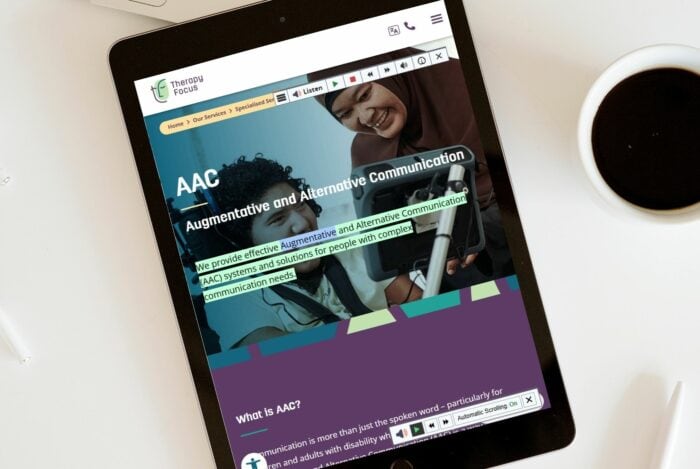
By using ReadSpeaker’s webReader tool, the content on our website can be read aloud to you with just one click. The text is read out loud and highlighted for easy follow-along, no matter your device or location. This makes the content more accessible and visiting our website a richer experience for all users, without requiring any downloads.
Read on to discover helpful information to help you make the most of the tool.
How does it work?
Activate webReader by clicking the Listen button.

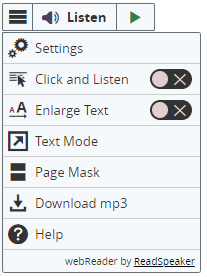
webReader also allows you to:
- Select text and click the Listen button in the pop-up menu that appears to have the selected text read aloud.
- Click in a paragraph to have it read out automatically.
- View a clutter-free version of the web page with text in your preferred font, size and colour as it is read aloud and highlighted.
- Download an audio version of your content for offline listening.
- Translate selected text to several languages and have the text read out in the target language.
- Personalise reading speed, highlighting colours, and more.
- Use the Enlarge Text feature to show the text being read at the bottom of the page in a large font size.
- Select a word and find its definition in the dictionary.
Clear instructions on how to use each feature are provided in the Help Tool, which is found in the menu. Try reading through the Help Tool to pick up ideas on how to make optimal use of webReader’s features.
Playback tips
For the best experience with ReadSpeaker, we recommend stopping and restarting playback instead of pausing it. Pausing doesn’t fully reset the player, which may cause issues with audio playback or language selection.
If you have to switch languages either before or after using ReadSpeaker, you might need to refresh the page for everything to work smoothly.

Platforms and web browsers
WebReader works on almost any device, including PCs, laptops, tablets, smartphones and Chromebooks. It supports all major operating systems like Windows, macOS, Linux, iOS, Android and Chrome OS, and works with popular browsers such as Chrome, Safari, Firefox, and Edge.
To learn more about ReadSpeaker’s text to speech service visit readspeaker.com
Supported languages
Our website can be translated into different languages using the options in the top menu. However, not all languages work with the text-to-speech feature. Here’s a list of the languages that do work and are selectable with text-to-speech tool:
- Arabic
- English
- Farsi
- Hindi
- Indonesian
- Mandarin (Chinese)
- Spanish
If the website is translated into a language not on the list above, the text will be read in English or an error message may play, such as “could not find the text to read.”
Help with difficult words
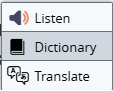
Highlight any word on the page to bring up a toolbar with these options:
- Listen – Hear the text read aloud.
- Dictionary – See an automated definition.
- Language – Get an automated translation into another language.
Please note that definitions and language translations are automated and not defined by Therapy Focus.
Automatic scrolling
During audio playback, a control panel will stay visible on the right side of your screen when on a desktop computer, or the bottom of your screen when viewing the website on mobile devices. The page will automatically scroll to follow the highlighted text.
On a desktop computer, this feature can be turned on or off by clicking ‘Automatic Scrolling On/Off’ in the control panel.

Download audio
When you want to download audio using ReadSpeaker, find the text you want to listen to, then tap on the ‘Listen’ button. When the playback controls pop up, look for the ‘Download’ option to save the text as an MP3 file.
Website accessibility
Therapy Focus ensures accessibility by adhering to WCAG 2.1 Level AA standards, offering responsive design, assistive features, and alternative formats while encouraging users to report issues for continuous improvement.
By Brett Syme
Brand Engagement Manager
Last Updated 7 May 2025